HRSS error 03-0X-FE / 03-0X-FF – Battery insufficient / battery empty: how to solve
HIWIN HRSS error 03-0X-FE (Battery insufficient) / 03-0X-FF (Battery empty): what the encoder battery alarm means, why it appears and the first checks.
Summary
This alarm concerns the four 3.6 V batteries in the robot arm that let the absolute encoders in the motors remember their position while the robot is off. The controller does not recharge them, so replace all four with genuine batteries. If they had already run empty, redo the zero position before running any program.
Symptoms
- The pendant shows a battery warning for one or more axes: battery insufficient (03-0X-FE, where X is the axis number), and later battery empty (03-0X-FF).
- It often appears at the first start-up after a long time without power. Typical cases are a commissioning that was postponed while the robot sat in its shipping crate, a holiday shutdown, a move, or a robot kept in storage.
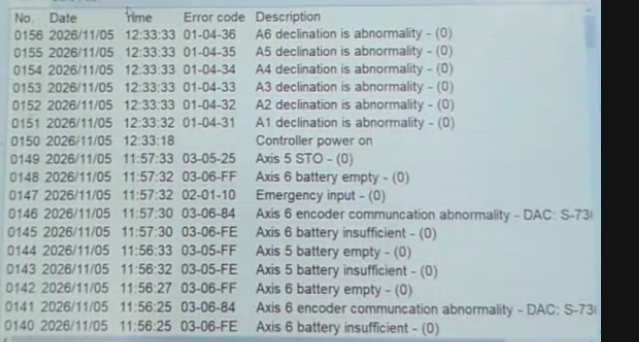
- If the batteries ran empty while the robot was off, the next start also brings declination (position) alarms on the axes, such as 01-04-31 to 01-04-36. The robot no longer knows exactly where it is.
Likely causes
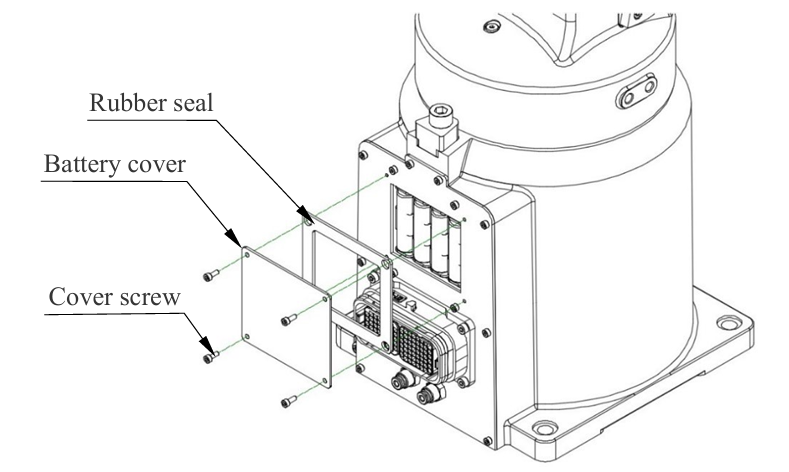
Every axis motor has an absolute encoder built in, so the encoders sit inside the manipulator. When the main power is off, these encoders keep their position using backup batteries. The batteries are in the robot arm, not in the controller. On the HIWIN 6-axis and SCARA models we checked, there are four 3.6 V batteries in a battery box on the manipulator. The exact location depends on the model, and the manipulator manual shows where it is. The usual replacement interval is about one year. The controller does not recharge these batteries, so “not charged” means they need replacing.
- The batteries are at the end of their life. They have been in service for a year or more.
- The robot was unpowered for a long time. The batteries are the encoders’ only supply during that time, so they drain steadily.
- A bad connection. A loose or damaged battery connector gives the same warning, typically after maintenance on the arm.
Good to know: why the batteries run down
The batteries only work when the robot is switched off. While the controller is powered, it supplies the encoders and the batteries are hardly used. This leads to a result that surprises many people: a robot that runs 24/7 keeps its batteries longer than one that runs 8 hours a day and sits switched off for the rest of the day. The worst case is a new robot whose commissioning has been delayed. It can spend months in its crate with the batteries remembering encoder positions the whole time. It then arrives at first start-up with flat batteries.
Once the batteries are empty, the encoders lose their position. New batteries alone do not bring it back. The zero position has to be redone.
Safe checks
- Make the cell safe according to your site’s procedures.
- Note the exact alarm codes and which axes they name. Check the alarm history for when the warning first appeared.
- Make sure you have a recent backup of the robot’s data.
- Order genuine replacement batteries for your robot model from your HIWIN supplier. Replace all four with new ones and don’t mix old and new.
- Have a trained person replace them in the battery box on the manipulator, following the manipulator manual for your model. A preventive change done the way the manual describes, before the batteries are empty, can keep the position. Removing all batteries at once loses it.
- If the batteries were already empty, or the robot shows position alarms, redo the zero position following the official manual and using the tools it specifies. Don’t run automatic programs until this is done.
- After setting the zero position, check the robot at a known reference point at low speed. Then run a program at reduced speed before returning to production.
When to get help
Book a call in any of these cases:
- You’re not sure whether the zero position was lost.
- You need help redoing the zero position and checking it against your existing points.
- The battery warning comes back soon after fitting new batteries.
Batteries and hardware faults under warranty go to your HIWIN supplier or local HIWIN office.
Independent explanation written by Giovanni Ventilii. This is not official HIWIN documentation. Always follow your robot's official manuals, your site's safety procedures and your supplier's instructions.